
Smart Collect for Premiere Pro
-
Compatibility Premiere Please check exact version compatibility under the "COMPATIBILITY" tab below
 Adding to cart...
IMPORTANT:
If you click "select folder" and nothing happen, try one of this options:
- Check your OS taskbar. In some cases, the "select folder" window appear already minimized on the taskbar.
- Update Premiere Pro. Version 2421 (Build 2) introduced a bug that cause the extension to malfunction and have been fixed in the next update
Update: you can collect multiple sequences with an easy and quick method, check the video at the bottom.
What is the purpose of Smart Collect:
Smart Collect allow to make a copy of the files used in a timeline, avoiding this way to copy all the non used material. Furthermore, the copied material will be organized in a folders structure that mirror the one that the user has created inside Premiere.
The Premiere Pro native function “project manager” provides the same feature, but it doesn't keep track of the material used in the nested sequences, leaving to the user the time-consuming labor to write down one at the time all the nested sequences names used in the project, adding the risk to skip one of said sequences. Imaging the scenario where there are nested sequences inside other nested sequences inside others ecc… the user should open each sequence and write down all the sequences names.
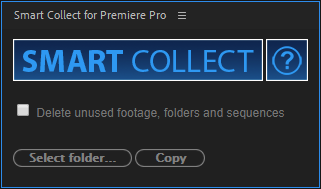
Using Smart Collect, the user needs only to open the desired sequence, click on the copy button and Smart Collect will do the job.
Features:
-
Make a copy on disk of all the assets used only in the selected timeline.
-
Save a copy of the project and relink it's clips to the copied ones.
-
The assets will be copied in a folder structure that will be the same of the one created in Premiere project window. With this feature, you can import assets without the need to copy and organize them before importing in Premiere
-
You can shrink your project deleting unused assets and timelines
A couple of limitation:
-
After effect imported project: due Premiere Pro scripting limitation, it's risky for Smart Collect to handle these files. To avoid errors, Smart Collect will only generate a log files (AE Files.txt), where you can find the paths of after effect projects used, so you can backup and relink it manually. At the end of the copy process, a popup will remind you how many after effect projects there are to relink. Always remember to relink, otherwise they will point to the original files and not the copied ones. Check the manual for more info.
-
Graphic essential template: due Premiere Pro scripting limitation, unlike after effect projects, these files will be ONLY copied, but NOT relinked. Smart Collect will generate a log (AEG files.txt) that shows you the path where is the copied template, so you can easly relink it. At the end of the copy process, a popup will remind you how many template there are to relink. Always remember to relink, otherwise they will point to the original files and not the copied ones. Check the manual for more info.
Quick history:
Initially, we developed this extension for personal use only. After a while, some colleagues saw the tool and said it was a feature they were looking for, so we decided to create a new, polished version, to publish.
In the 2024 CC, a bug from Adobe is causing the extension to malfunction. In the beta version of Premiere, the bug has already been fixed and will also be resolved in the official version with the next update. In the meantime, you can use Premiere beta with regular projects, as they are interchangeable.
| Premiere | 2024, 2023, 2022, 2021, 2020, CC 2019, CC 2018, CC 2017, CC 2015.3, CC 2015, CC 2014 |
|---|
1.0.1 (Current version) - Feb 21, 2024
The error message was "I'm going to copy O file(s). Be sure to have NaN undefined of free disk space"
1.0.1 - Feb 5, 2024
The error message was "I'm going to copy O file(s). Be sure to have NaN undefined of free disk space"
1.0.0 - Nov 12, 2020
-

- Compatibility Premiere
SubMachine
Add to CartThe Engaging, and Customisable Subtitling Solution for Adobe Premiere Pro.
Available as a perpetual license or subscription. This is a perpetual license.
-
- Compatibility Premiere
Automation Blocks for Premiere Pro
Add to CartAutomation Blocks is an infinite collection of premade, one-click tools for any task. With Automation Blocks, you can fully customize all the tools, and even create your own!
$59.99 -

- Compatibility Premiere
One Click Export
Add to CartThe fastest & easiest way to export your sequences. Up to 28 customizable render buttons. Win & Mac. Choose who to export: Premiere or Media Encoder. And also quick frame export. Just one click and GO!
-

- Compatibility Premiere
Permanent Markers for Premiere Pro
The Adobe Premiere Pro extension that lets you export multiple still frames from a sequence at once. Batch image exports with different file type options, resolutions, and custom naming.Add to Cart -

- Compatibility After Effects
pt_ImportSubtitles
Add to CartUseful if you need to embed subtitles onto video for web or tape delivery. Import subtitles into After Effects using Encore Text Script, SubRip SRT or WebVTT formats, render with alpha to import into your editing software, or use directly in Premiere Pro with Dynamic Link.
-
- Compatibility Premiere
Ultimate Toolkit for Premiere Pro
Add to CartSave 15% with this bundle of essential tools for Premiere Pro
Regular Price: $299.99
Special Price: $254.99
-

- Compatibility Premiere
Instant Assets Versioning for Premiere Pro
Add to CartVersion up/down your clips in the Premiere Pro timeline with a single click. Avoid the hassle of the time-consuming standard procedure!
$9.99