
breakdowns
-
Compatibility After Effects Please check exact version compatibility under the "COMPATIBILITY" tab below
 Adding to cart...
 Export labeled sequences and videos from vertical stacks.
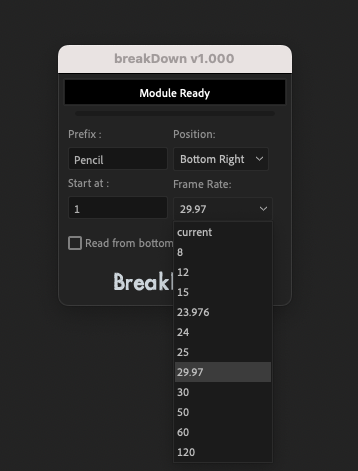
BreakDowns is for for animators who work with vertical stacks in After Effects, offering a smooth transition for those accustomed to animating with Photoshop.
The primary advantage of BreakDowns is its ability to export your animations with a single click while automatically labeling layers and saving you from the hassle of manual numbering or adding redundant information. BreakDowns also generates labeled high-definition PNGs conveniently stored in a dedicated folder. Simplify your animation process and enhance your workflow with the power and efficiency of BreakDowns.
BreakDowns provides a range of customizable options to suit your specific needs. For example, you can adjust the prefix for layer tags, define the start number, choose the overlay position, select the desired framerate, and determine the order of layers (bottom to top or vice versa). Additionally, Breakdowns grab your text style, and you can position the layer number overlay.
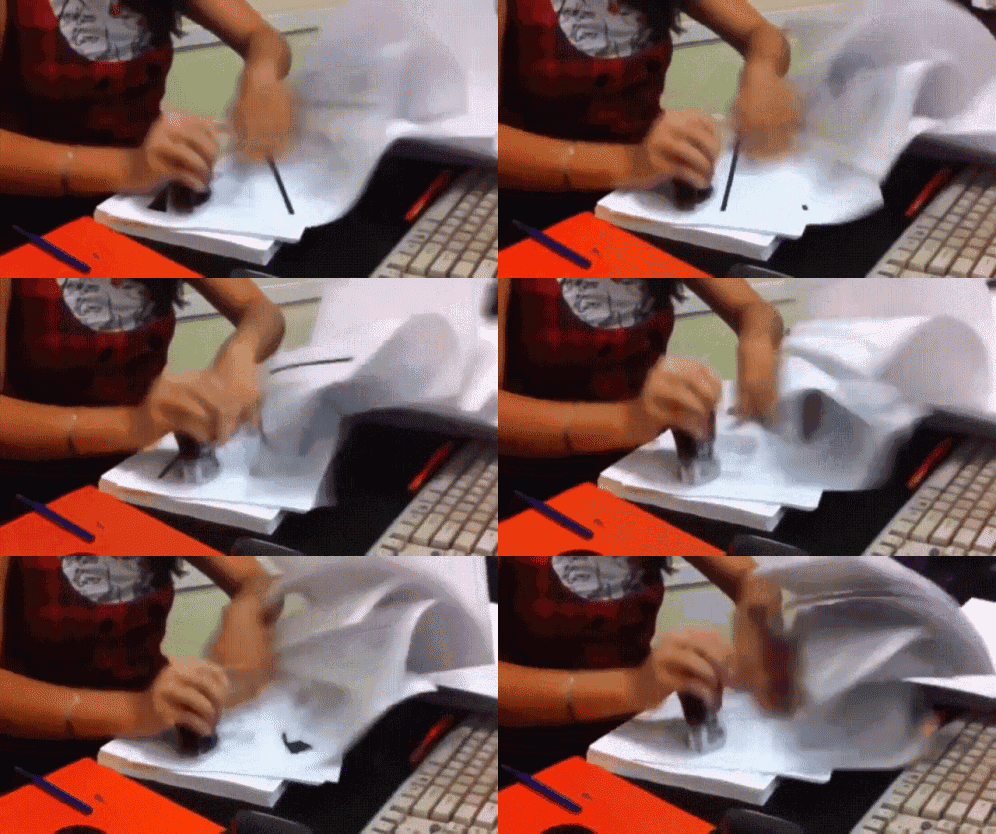
- BreakDowns automatically creates labeled and numbered PNG images based on your layer stack. These images are saved in a uniquely named folder derived from your composition and a series of numbers. This unique naming system makes it suitable for versioning purposes.
- Concurrently, BreakDowns renders a video that includes the labels and is based on your chosen frame rate. This video is stored in the animation folder with a unique name, which also supports versioning by keeping each animation sequence distinct.
- No additional elements are added to your project, ensuring your layers remain unaltered and your project stays clutter-free.
- BreakDowns only requires one frame to function, as it utilizes the PlayHead and processes layers vertically, either from top to bottom or from bottom to top, depending on your preference.
- By generating unique sequences and animations, BreakDowns streamlines your workflow and facilitates effective project versioning.
| After Effects | 2024, 2023, 2022, 2021, 2020 |
|---|
1.000 (Current version) - Apr 21, 2023
-
- Compatibility After Effects
Queue Work Area
Queue your comp with the work area set as a custom duration. This way you can set several work areas to one queue and render them all at once.Add to Cart -

- Compatibility After Effects
XML Gibson
XML Gibson is a script that allows you to export your composition to XML files.Add to Cart -
- Compatibility After Effects
pt_OpenSesame
Export projects for spreadsheet editing, template versioning and server automation, create backwards compatible projects for any version back to CS3. OpenSesame truly opens up the After Effects project format.Add to Cart -
- Compatibility After Effects
OBJ Vertex Export
Export wavefront OBJ vertex point clouds from After Effects layer positions.Add to Cart -

- Compatibility Premiere
Editing Essentials Bundle
Add to CartThree indispensable tools for your Adobe Premiere Pro editing workflow: BeatEdit 2, QuickImporter and Still Exporter.
-

- Compatibility After Effects
GifGun 2
Add to CartOne-click animated GIFs in After Effects. It's version 2, so it's better! New: Alpha Matte for GIF
-
- Compatibility After Effects
Match
Add to CartMatch simplifies the handling of expressions and scripting, offering features like path fetching, error handling, on-the-fly expression formatting, easing function copying, and expression baking. It supports all After Effects property types and provides an intuitive and responsive UI.
$17.50 -
- Compatibility After Effects
voodoo
Add to CartAnimate pins easier. Period. Solution for the puppeteering woes of the digital age: The Seamless Puppet Tool puts the "fun" in function, as it effortlessly unlocks creative freedom with its refreshingly unpretentious pin tracking and conjuring controller abilities. Prepare to be enchanted!
$18.00 -

- Compatibility After Effects
Volume n' Tricks 2
Add to CartCraft Breathtaking Animations in Faux-3D, compatible with Lottie Files.
Isometric Extrusion on Multiple Layers at Once.
Isometric Projection., Grid and moves.
Parented Isometric Shadows.
Pivot/Rotation Feature.
And more!$39.99 -
- Compatibility After Effects
Tweaks
Add to CartAdvanced control over paths, shapes, and layer distributions: + a Toolkit related: Grid, Bake and Exlode LayersFrom morphing shapes to fine-tuning paths and innovatively distributing layers, this tool will enrich your creative experience; with Tweaks, your artistic possibilities expand, limited only by your creativity.
$30.00 -
- Compatibility After Effects
REACH: AEssential Kit
Add to Cart
Ready to take your motion design workflow to uncharted territories? Reach is an all-encompassing, adaptable, and ever-evolving toolset.
It infuses the After Effects toolkit with a medley of uniquely innovative utilities. From elementary to intricate, Reach takes the expected and elevates it into the realm of the extraordinary. Simplify the complex, streamline the cumbersome, and catalyze your creativity with Reach - the quintessential companion for every After Effects adventurer
Elevate your art. Reach for the stars.$42.00 -

- Compatibility After Effects
Handy Particles
Generate particles from various shapes, including custom ones, a feature not native to After EffectsAdd to Cart
Create particles using shapes like Ellipse, Rectangle, Star, Polygon, Triangle, Bar, and Custom Shape
Customize particle size, shape, and direction. You can choose between a static size or random sizing
Burst effect including exploding or imploding particles
Fine-tune your setup using Effect Controls$19.99