
BS_CompositingBundle 2
-
Compatibility After Effects Please check exact version compatibility under the "COMPATIBILITY" tab below
-
Compatibility Premiere Please check exact version compatibility under the "COMPATIBILITY" tab below
 Adding to cart...
 This is a bundle of three native plugins that will upgrade your current compositing workflow by allowing you to combine mattes, solids and layers without having to pre-compose. The plugins included are:
- bs_SmartSetMatte
- Takes the information from another layer and converts it into the alpha channel of the current layer.
- bs_MixColor
- Mixes solid color into image using various blending modes.
- bs_MixLayer
- Mixes another layer into image using various blending modes. Possibility to adjust input layer before mixing it into the image.
bs-Smart Set Matte
32 bpc compatible Set Matte effect with additional controls. Takes the information from another layer and converts it into alpha channel.
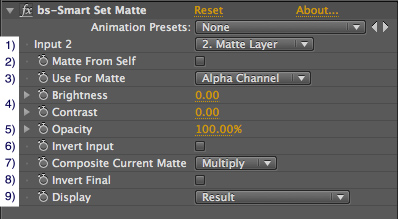
1. Input 2: Layer to take the matte from
2. Matte From Self: Ignore Input 2 and take matte from the current state of self. All effects applied before bs-Smart Set Matte will be taken into account. If you want to use the source of self ignoring effects - disable this option and choose self as Input 2.
3. Use For Matte: What data from input to use for Matte. Options: Alpha Channel, Luminance, Lightness, Red Channel, Green Channel, Blue Channel.
4. Brightness and contrast: Controls for adjusting the input matte
5. Opacity: Opacity of input matte
6. Invert Input: Inverts the input matte before mixing with current matte
7. Composite Current Matte: Operation to be used to mix the input matte with the current matte. NONE means - ignore current matte. Other options: Multiply (default), Add, Subtract, Divide, Min, Max.
8. Invert Final: Inverts the matte after mixing it with the original matte.
9. Display: Result - display final result of the effects Image before - desplay image before. Disable effect. Matte before - display matte before. Input Image - display Input 2 or in case of 'Matte From Self' image before Input Matte - display input matte - 'Use For Matte' converted to matte Input Matte Corrected - display input matte after Brightness/Contrast corrections New Matte - display resulting matte.
bs-Mix Color
32 bpc compatible effect. Mixes solid color into image using various blending modes. With combination of 'Set Matte' or 'bs-Smart Set Matte' - possibility to use data from another layer to determine alpha used for mixing the solid.
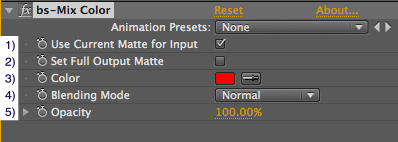
1. Use Current Matte for Input: Mix the input color using only the area defined by current matte of the layer. Pixels with Alpha'0' will not be affected.
2. Set Full Output Matte: Sets output matte to 100%.
3. Color: Defines color to be mixed.
4. Blending Mode: Blending mode to be used for mixing color defined by 'Color' controller.
5. Opacity: Opacity of input color
bs-Mix Layer
32 bpc compatible effect. Mixes another layer into image using various blending modes. Possibility to adjust input layer before mixing it into the image. With combination of 'Set Matte' or 'bs-Smart Set Matte' - possibility to use data from another layer to determine alpha used for mixing the input layer.
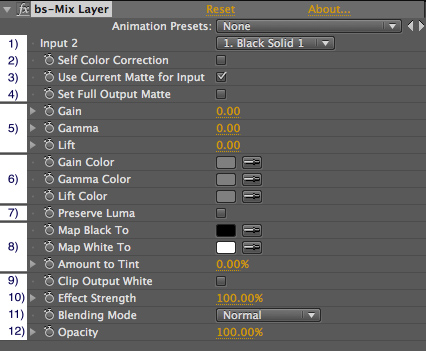
1. Input 2: Layer to be mixed into the image.
2. Self Color Correction: Ignore Input 2 and use effect as color correction tool.
3. Use Current Matte for Input: Mix the input layer using only the area defined by current matte of the layer. Pixels with Alpha '0' will not be affected.
4. Set Full Output Matte: Sets output matte to 100%.
5. Gain/Gamma/Lift sliders: Correct gain, gamma and lift of the input layer.
6. Gain/Gamma/Lift color pickers: Colors to be used as gain, gamma and lift corrections.
7. Preserve Luma: If checked on - luminance correction will be applied after Gain/Gamma/Lift colors, so that it matches luminance determined by Gain/Gamma/Lift sliders. Use it if you want to control luminance via sliders and chrominance (hue and saturation) via color pickers.
8. Tint controllers: Tints the image. Controllers work the same as in standard 'Tint' effect. Note that by default 'Amount to tint' is set to zero.
9. Clip Output White: Clips resulting image to 1.0 (255 in 8bpc format). When working in 8 bpc this will happen anyway, but in 32 bpc you have a choice. Note that negative values will be clipped to zero no matter what you do.
10. Effect Strength: Strength of all the adjustment.
11. Blending Mode: Blending mode to be used for mixing the layer.
12. Opacity: Opacity of input layer.
Upgrade notice: If you purchased this item in the last year (when it was a "Name Your Own Price" item) you will get a discount equal to 100% of what you paid. If you purchased it over a year ago you will get a discount equal to 50% of what you paid. Login to see the discounted price if you qualify.
| After Effects | CS6, CS5.5, CS5, CS4, CS3 |
|---|---|
| Premiere | CS6, CS5.5, CS5 |
Current version: 2.2
- 2.2 Fixed alpha channel bug in bs_SmartSetMatte - Jan 2013
- 2.01 Fixed preferences location on Windows - Jan 2013
- 2.0 Ported to be native, added CS6 support - Dec 2012
- 1.1 Fixed small math bug in bs_MixLayer - Apr 2011
- 1.0 Initial release on aeplugins.com - Mar 2011
-

- Compatibility After Effects
bq_Project Panel Navigator
A compact toolbar to quickly navigate & edit Project Panel items.Add to Cart -

- Compatibility After Effects
Mobo Super Suite
Add to CartThe ultimate software suite for motion designers and creative professionals. Mobo Super Suite brings together the best tools from Motion Boutique to offer you a limitless creative experience. Get Newton 4 + Connect Layers PRO + Pastiche 2 + Plotter + Mobo_Utils + AutoStereogram + LayerGenerators at an amazing price!
Regular Price: $538.05
Special Price: $399.99
-
- Compatibility After Effects
- Compatibility Premiere
Goodbye Greenscreen
Add to CartNow available for macOS (>11.5) and Windows! Artificial Intelligence-based plugin for automatic human matting.
-

-
-
- Compatibility After Effects
GifGun 2
Add to CartOne-click animated GIFs in After Effects. It's version 2, so it's better! New: Alpha Matte for GIF