
CircusMonkey
-
Compatibility After Effects Please check exact version compatibility under the "COMPATIBILITY" tab below
 Adding to cart...
"I love the ability to have more control over the animation after running the script with the effect controls.. brilliant!" Ian Robinson
"CircusMonkey is another well-thought-out tool that promises to be really useful. I can't wait to put it into production." Brian Maffitt
"...a very efficient way to create complex title sequences and promo graphics inside After Effects" Eran Stern
"...this opens up a lot of 3D doors, not only for text, but even using this as a placeholder for other elements! " - Charles Marshall
Welcome to the Circus!
CircusMonkey is a follow up to the original TypeMonkey, our first kinetic type generator. While both generate kinetic typography, they go about it differently and the results are unique.
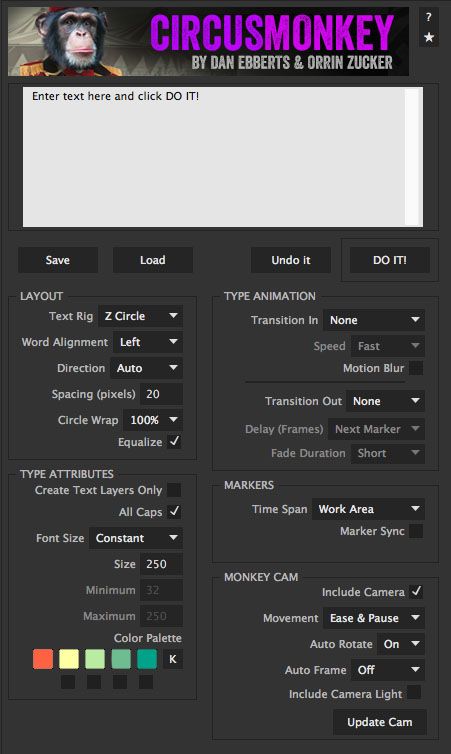
CircusMonkey's Text Rigs are at the core of a system that allows you to create a series of basic 3D shapes with your text. It has multiple animation options, an automatically generated camera that moves from one word to the next, and marker-based timing controls that make adjustments a breeze.
An additional set of live, effects-based controls allows you to adjust the layout, animation, camera angle, and visibility of the kinetic rig after the initial build.
As with all our Monkey scripts, it's designed for a wide range of users, from beginners to experts.
Includes:
-7 Flexible Text Rigs
-Multiple Alignments
-Kuler Palette Import
-Multiple Transition In and Out options
-Markers dynamically linked to text and camera with no keyframes
-Marker sync feature helps make automatic VO and music sync a breeze
-Timing changes as simple as sliding a marker
-New camera algorithm allows for breakthrough dynamics
-Effects control for additional post-build adjustments
-Visibility Controls to help separate words in Z space
-Free MonkeyTools to help build and manage project
Check out the CircusMonkey Tips & Tricks
.
About Monkey Scripts: Monkey Scripts are practical production tools designed with both the novice and professional in mind. They can save hours, or even days of work by helping automate the creation of motion graphics.
| After Effects | 2024, 2023, 2022, 2021, 2020, CC 2019, CC 2018, CC 2017, CC 2015.3, CC 2015 |
|---|
CircusMonkey
1.11 (Current version) - Oct 25, 2023
1.10 - Oct 21, 2022
1.09 - Aug 18, 2022
1.08 - Apr 27, 2022
1.07 - Jan 23, 2022
1.06 - Feb 2, 2021
1.05 - Nov 1, 2019
1.04 - Aug 31, 2019
1.03 - Oct 15, 2018
Update expressions for AE's new JavaScript engine.
Update licensing framework.
1.02 - May 12, 2017
1.01 - Dec 26, 2015
1.00 - Nov 23, 2015
MonkeyTools
1.03 (Current version) - Nov 21, 2015
-
- Compatibility After Effects
MonkeyBars
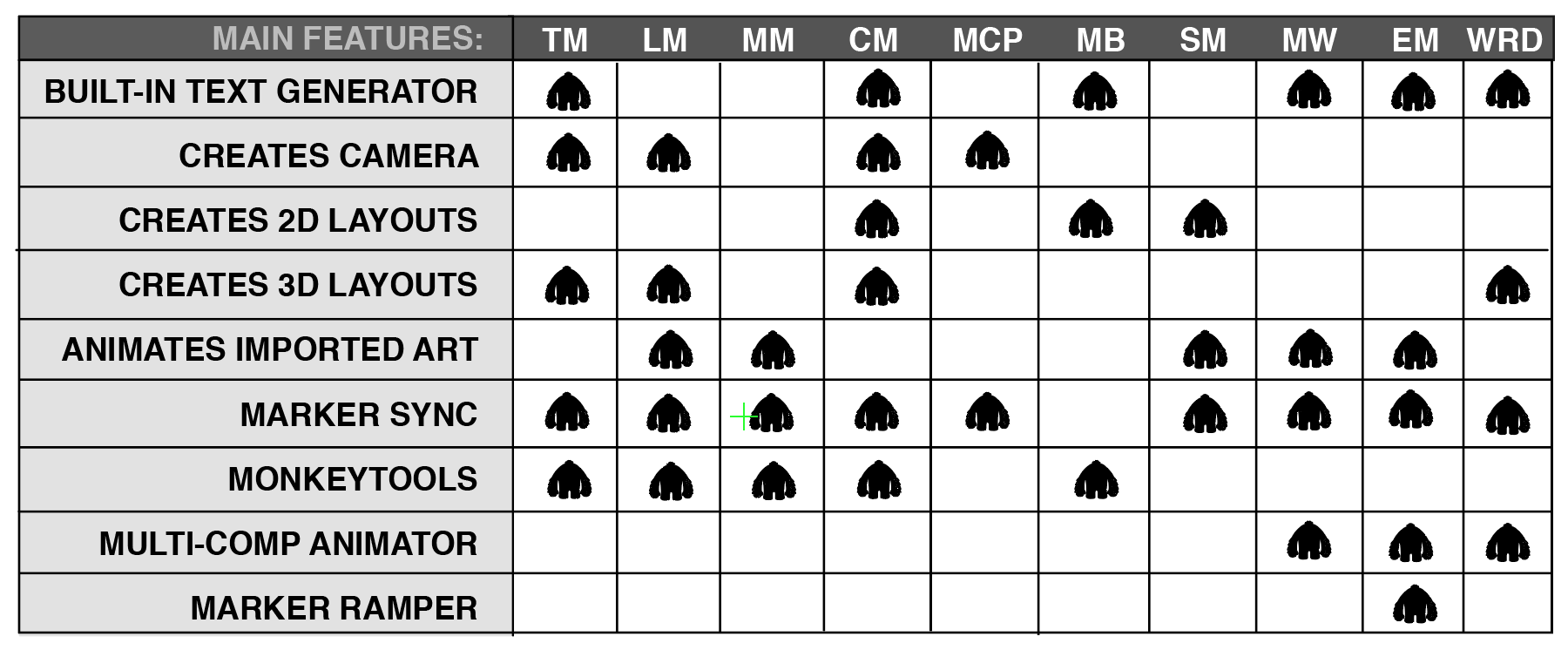
Add to CartThe quickest, easiest way to create animated lower 1/3s. This Monkey is a workhorse.
-
- Compatibility After Effects
LayerMonkey
Add to CartCreates and animates unique layouts in seconds. Think TypeMonkey for layers!
-
- Compatibility After Effects
MotionMonkey
Add to CartThe easiest way to animate your layered art. One layer or one hundred at a time. Great for all levels - from novice to expert.
-
- Compatibility After Effects
TypeMonkey
Add to CartThe easiest way to create kinetic typography. Automatically generate, layout and animate type based on our unique algorithm. The best-selling Monkey!
-
- Compatibility After Effects
MonkeyCam Pro
Add to CartA wild procedural camera with 1-click set up & marker-based motion effects. Works with 3D layers or other Monkey Tools!
-
- Compatibility After Effects
textsyncr
Automatic speech-to-markers engine, automatically creates layer markers from audio transcription - drive subtitles, the Monkey tools and more.Add to Cart
-
- Compatibility After Effects
MonkeyBars
Add to CartThe quickest, easiest way to create animated lower 1/3s. This Monkey is a workhorse.
$59.95 -
- Compatibility After Effects
ShapeMonkey
Add to CartGenerate an endless variety of procedural shape layer animations in seconds. Works with text & vectors too!
$89.99 -
- Compatibility After Effects
MonkeyCam Pro
Add to CartA wild procedural camera with 1-click set up & marker-based motion effects. Works with 3D layers or other Monkey Tools!
$59.95 -
- Compatibility After Effects
Rubberize It!
Add to CartTurn any layer to Plastic, Rubber or Goop in seconds. Reacts naturally to motion without keyframes. Based on the kind of physics they taught in school!
$39.99 -
- Compatibility After Effects
Beatnik
Add to CartUnlock a new level of audio-driven edits, speed ramps, retimings & more with just 1 click.
$69.00 -
- Compatibility After Effects
MonkeyWipes
Add to CartA wild procedural transition system with virtually endless possibilities. Built for easy experimentation. Great for logos, text or motion graphics.
$89.99