
GridGuide
-
Compatibility After Effects Please check exact version compatibility under the "COMPATIBILITY" tab below
 Adding to cart...
How guidelines SHOULD work in After Effects.
Sander Van Dijk
GridGuide is simple, but REALLY powerful. If you value precision in your designs, GridGuide is a must-have.
Joey Korenman, School of Motion
Key Features
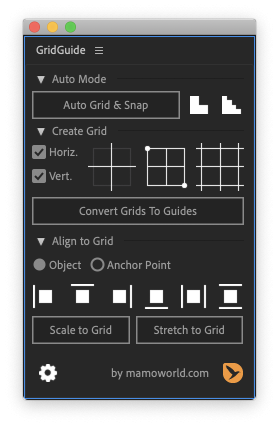
- Auto Layout improves your designs – even for people with no design background. Just place your layers roughly where they should be, select them, and click the Auto Grid & Snap button. GridGuide applies fundamental design rules to improve the placement and size of your layers, determining the grid that best fits your content.
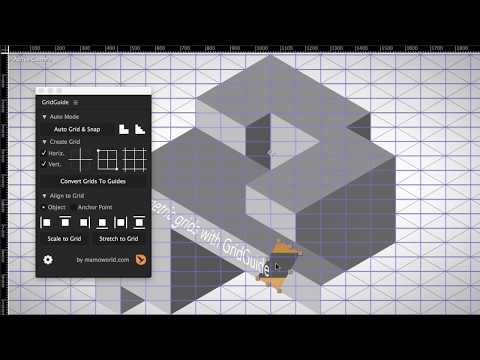
- Modifiable Shape Layer Guides – because motion design isn't static. GridGuide's grids are based on shape layers, which means that you can move, rotate, scale, parent and keyframe them just as any other layer. Don't limit yourself to static designs – let your guides follow your motion.
- Intuitive Alignment Tools – allows you to align, scale and stretch layers. Just click them several times to make a layer jump from one grid line to the next. Of course, the alignment tools also work on rotated grids.
- Native, snappable After Effects guides – if you prefer guides that you can snap to interactively, you can convert your shape layer guides to native After Effects guides using the Convert Grids to Guides button. There are many ways to create grids in After Effects, but GridGuide is the only automated solution to create truly snappable guides!
- Fully customizable grids including controls for gutter, margin, stroke color, stroke width, and more. What’s more, GridGuide supports both bounded and infinite grids, as well as grids that consist of horizontal or vertical lines only.
- Single Lines and Crosshairs add even more flexibility to your design. Of course, the alignment tools work with those lines, too – even if there are many of them in the composition.
Tutorials



New AE design script 'GridGuide' - I wish Illustrator worked like this! Nice work @mamoworld https://t.co/ZxxmYDMvOi pic.twitter.com/W9Ga1tuFtO
— Jayse Hansen (@jayse_) April 12, 2017
Thanks for building this great script @mamoworld, using it right now on a project!
— Sander (@georegulus) April 3, 2019
We finally have powerful grid manipulation & snapping tools — @aescripts comes to the rescue where @AdobeAE can't. https://t.co/Wv5KEvkC4r
— Mograph Tips (@mographTips) April 12, 2017
GridGuide is one of those tools that you can integrate into your workflow NOW. No gimmicky fun stuff, it just works. Align Panel on steroids
— VinhSon Nguyen (@CreativeDojo) April 14, 2017
Instant purchase. Thanks for crafting such a much-needed capability!
— Ryan Summers (@Oddernod) April 3, 2019
This script is gold... Nice work on this @mamoworld! https://t.co/h0pYkiYAeO
— School of Motion (@SchoolOfMotion) March 26, 2019
If you are using Ae 16.0 or older
Photoshop required for old Ae versions
On Ae 16.0 or older, Adobe After Effects doesn't grant extensions access to its guides – they simply cannot create or modify them. Nevertheless, GridGuide can create these guides for you using a clever workaround: it uses some Photoshop magic in the background since Photoshop extensions can create guides. What does this mean for you?
If you want to use the "Convert Grids to Guides" function on Ae 16.0 or older
- Photoshop must be installed on your system
- GridGuide will launch Photoshop if it is not yet running
- "Convert Grids to Guides" may take a few seconds to take effect
You don't need to do anything manually in Photoshop – the entire process of creating the guides is automated. Although it may take a few seconds, it is certainly the fastest way to create snappable guide grids in After Effects.
On newer Ae versions, this workaround is not necessary anymore and the creation of guides works instantly.
| After Effects | 2024, 2023, 2022, 2021, 2020, CC 2019, CC 2018, CC 2017, CC 2015.3, CC 2015, CC 2014, CC, CS6, CS5.5, CS5, CS4 |
|---|
1.1.007 (Current version) - Mar 2, 2023
1.1.006 - May 2, 2022
1.1.005 - Oct 12, 2020
1.1.004 - Jul 17, 2020
1.1.003 - Aug 1, 2019
1.1.002 - Apr 11, 2019
1.1.001 - Apr 5, 2019
- fixed tiny issue with Ae 16.1
1.1.000 - Apr 3, 2019
1.0.002 - Dec 14, 2018
1.0.001 - Sep 20, 2018
1.0.0 - Apr 1, 2017
-
- Compatibility After Effects
Align3D
"Align3D" is the simple 3D space align and distribute script that can be used intuitively. In addition to "Align", Z-Axis & Other Transform, Range Option.Add to Cart -

- Compatibility After Effects
Chubs - Animated Typeface
Add to CartBring your designs to life with the playful charm of Chubs, a typeface that seamlessly merges graffiti throw-up style with bubbly motion. Its playful curves create a vibrant and energetic visual impact without sacrificing legibility.
Order 4 or more Animography Typefaces and save 25%. -

- Compatibility Davinci Resolve
MVRK for DaVinci Resolve
Add to CartDynamic symmetry composition guides for DaVinci Resolve
$15.00 -

- Compatibility After Effects
Type-36 - Animated Typeface
Add to CartType-36 is a clean, capsule-like and geometric typeface. The animations are applied to the ExtraBold weight and are a highly customizable glitch style reveal. Control color, distortion and secondary elements to tailor Type-36 to your project.
Order 4 or more Animography Typefaces and save 25%From: $38.00
-

- Compatibility After Effects
CuttanaNir2
Add to CartToolkit for creating write-on animations. Featuring 5 exciting new features.
-

- Compatibility After Effects
Templater Bot Subscription Recurring
Templater Bot extends Templater Rig by offering full server automation, allowing you to build applications that version, render, and distribute custom video on demand. Yearly Recurring as well as 1, 3, 6, or 12 month licenses are also available.Add to Cart$450.00 As low as: $270.00
-

- Compatibility After Effects
Orient World
After camera tracking set the ground plane of your scene and orient everything accordingly.Add to Cart$19.99 -
- Compatibility Premiere
Automation Blocks for Premiere Pro
Add to CartAutomation Blocks is an infinite collection of premade, one-click tools for any task. With Automation Blocks, you can fully customize all the tools, and even create your own!
$59.99 -
- Compatibility After Effects
Glitch Bundle for Squash & Stretch Pro
Add to CartThis bundle includes 18 behaviors with 69 variants and more than 50 sound effects to create glitch effects with Squash & Stretch Pro.
$0.00 -

- Compatibility After Effects
- Compatibility Premiere
- Compatibility Audition
BeatEdit Bundle 2
Add to CartBuy BeatEdit for After Effects, Audition and Premiere Pro and save $150!
$199.97 -
- Compatibility After Effects
TextExploder V3
Add to CartSplit text layers into characters, words, lines and more. The placement of each character is accurately preserved without expressions, text animators or other tricks.
$19.99 -

- Compatibility Audition
BeatEdit for Audition
Add to CartBeatEdit detects the beats in your music and generates markers for them in Adobe Audition. This means you can easily match the tempo of two songs, edit your music, and seamlessly loop tracks – all with a few clicks.
$99.99