
Text2Spreadsheet
-
Compatibility After Effects Please check exact version compatibility under the "COMPATIBILITY" tab below
 Adding to cart...
 Text2Spreadsheet exports the text from your After Effects project to a spreadsheet where you can easily modify it with applications like Microsoft Excel, Google Docs, Apple Numbers or Open Office. When you are done editing, you can apply the changes to your After Effects project in a single click.
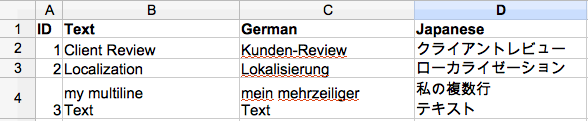
The spreadsheets are easy to read and also support several versions of your text. Perfect for translating your projects into different languages, or sending text to your client for review.
Features
import and export with a single click
There's no need to rename or otherwise mark the layers that you want to export to the spreadsheet.
simple tables
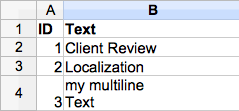
The spreadsheets generated just contain the texts, with no extra information. This not only makes them easy to read and modify - you also don't have to worry that your translator or client will accidentally break something in your project by modifying the spreadsheet.
modify your AE project and the spreadsheet in parallel
While your translators are working on the spreadsheets, you're still free to modify your projects. No matter how much you rename layers or compositions, or move layers to other compositions - Text2Spreadsheet will always know where each text in the spreadsheet belongs. Even if you add more text later, it'll be easy to integrate it into your existing spreadsheets.
handle several versions of your text
The spreadsheet contains one text per row. To create a new version, just add another column to your spreadsheet.
detailed status info
When you apply the changes to your project, you'll get detailed info about which text layers have been modified and in which compositions. If you have hundreds of texts, color coding makes it easy to find the texts that have been changed and allows you to efficiently check the compositions in your project that were affected by the change.

different file formats
Use the csv format for maximum compatibility (compatible with Google Docs, Apple Numbers, Microsoft Excel, Open Office and many other applications) or Excel XML format to benefit from color coding (compatible with Microsoft Excel and Open Office).
flexible filtering
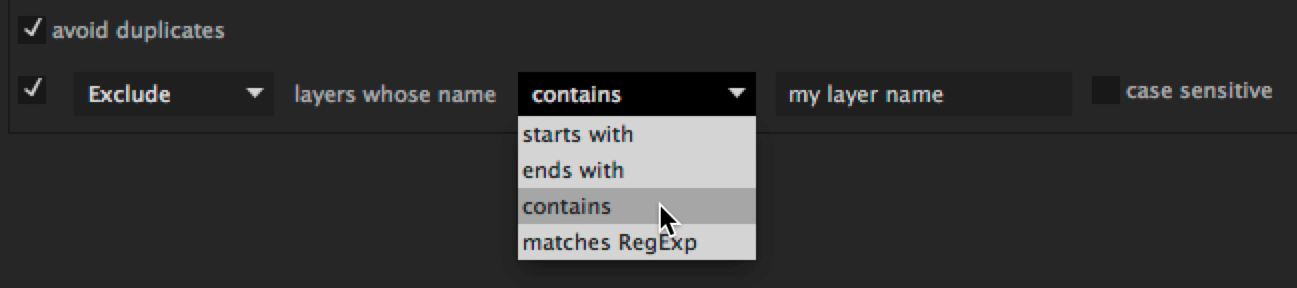
There are options to exclude text layers by name, or to only process a specific folder within your project. There is also an option to avoid duplicates in the spreadsheet, in case several texts in your AE project are identical.
full unicode support and multi-line texts
Spreadsheets are encoded as UTF-8, so will work with any characters. Multi-line texts are also directly supported - with no need to insert extra tags.
Is Text2Spreadsheet the right tool for me?
There are several spreadsheet solutions for After Effects. Text2Spreadsheet is your best choice if you only want to modify texts and you want the spreadsheet to be sufficiently easy to read and modify that you can send it to a client or translator.
CompsFromSpreadsheet can make more complex changes to the project, like replacing footage files, but you have to manually mark each layer that should appear in the spreadsheet.
Templater is like a Deluxe version of CompsFromSpreadsheet that supports, for example, intelligent layout. It is very powerful when you want to render many variants of a project, but if you want to quickly export all the text from your project, you would first need to apply a specific effect to each one of them.
Open Sesame exports and imports entire projects into a spreadsheet. As with to Text2Spreadsheet you don't need to manually mark each element that needs to show up in the spreadsheet, but you also have some control over which parts should be exported. In contrast to Text2Spreadsheet, even if you decide to only export the texts, the spreadsheets generated are more complex, containing comp IDs, layer IDs and various extra data. If you accidentally edit any of these, you can easily break something. Also, you cannot change the AE project and the spreadsheet in parallel. Once you insert, delete or move layers, for example, the data from the spreadsheet cannot be applied to the project anymore. Also, Open Sesame doesn't give the detailed status information that Text2Spreadsheet provides so it is more difficult to figure out what has been changed after you reimport a spreadsheet to your project.
The power of Open Sesame is that it can export way more than just text. If you need access to any single keyframe of your project, Open Sesame is your tool of choice.
| After Effects | 2024, 2023, 2022, 2021, 2020, CC 2019, CC 2018, CC 2017, CC 2015.3, CC 2015, CC 2014, CC, CS6, CS5.5, CS5, CS4 |
|---|
1.8.002 (Current version) - May 2, 2022
1.8.001 - Dec 5, 2019
1.8.000 - Aug 7, 2019
- fixed update check
1.007 - Nov 28, 2018
1.006 - Aug 7, 2018
- changed defaults (previously exported texts are now also included in later exports by default).
1.005 - Oct 2, 2017
1.004 - Nov 7, 2016
1.003 - Aug 18, 2016
1.001 - Oct 16, 2014
1.0 - Oct 9, 2014
-
- Compatibility Premiere
Ultimate Titles
Add to CartGenerate title animation procedurally or edit and use pre-generated presets
-
- Compatibility After Effects
Paragraph on a Path
Add to CartAuto-orient paragraph lines on a motion path.
-

- Compatibility After Effects
LottieFiles for Adobe After Effects
Export your After Effects animations instantly as Lottie JSON or dotLottie format for web and mobile apps for easy implementation.Add to Cart -

-

- Compatibility After Effects
Particle Pro
Add to CartThe easiest way to create professional particle effects in After Effects. Powered by Stardust (required and must be purchased separately)
-
- Compatibility After Effects
PATTOON 2 Texture & Displace
Add to CartPATTOON 2 Cyber SALE in November 2023 SAVE BIG Check out the new features. We put in some work so you can create even more stunning visuals more easily. See for yourself what the new and improved features can do.
- Glitch
- Displace Engine (improved)
- Flicker (improved)
- Turbulence (reworked)
- Displace Pixelshape(new)
- Displace Emission (new)
- Dissolve (new)
- Distortion (new)
Mix & match to create even more versatile effects. We can't wait to see what you can do with it.
Texture mapping in Adobe After Effects is finally made easy with PATTOON. Get direct layer access to your textures from Creative Cloud Libraries, Photoshop and more plus a bunch of extra features, textures and presets for all your designing needs.
50% upgrade discount price available. More information below
-

- Compatibility Premiere
Still Exporter
Add to CartSuper-fast exporter of still images from your Premiere Pro timeline - exports frames at markers as jpg, png, tiff or dpx images.
$29.99 -
- Compatibility Premiere
Automation Blocks for Premiere Pro
Add to CartAutomation Blocks is an infinite collection of premade, one-click tools for any task. With Automation Blocks, you can fully customize all the tools, and even create your own!
$59.99 -

- Compatibility After Effects
Squash & Stretch
Add to CartCreate animations with Squash & Stretch in no time with a collection of ready to use behaviors, carefully handcrafted by professionals and controlled by an intelligent system – ensuring your animations come to life without starting from scratch each time.
$0.00 -
- Compatibility After Effects
- Compatibility Premiere
Automation Blocks Bundle
Buy Automation Blocks for both Premiere Pro and After Effects and save 20%!Add to Cart$99.99 -

- Compatibility After Effects
Free eBook: Motion Graphics in After Effects that Speaks to Your Brain
Add to CartThis FREE eBook by mamoworld is here to bridge the gap between what you can figure out with learning by doing and what you need to know to become a professional motion graphics artist.
Please note that you do not need to add this to cart, you can download it directly using the links below.
$0.00 -

- Compatibility After Effects
Cartoon Bundle for Squash & Stretch Pro
Add to CartThis bundle extends Squash & Stretch Pro with various behaviors and sounds to give your animations an organic and fun cartoon style.
$19.99