
Still Exporter
-
Compatibility Premiere Please check exact version compatibility under the "COMPATIBILITY" tab below
 Adding to cart...
Video editors create more than just video: in this multimedia and social media age, clients often need to have a set of still images exported from their video. Still Exporter simplifies this process by allowing the user to set markers, choose a file format and let Still Exporter take care of the rest.
Workflow
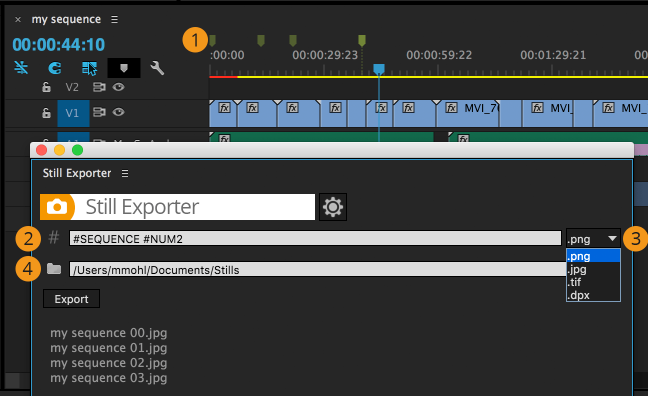
- Set markers at the frames you want to export.
- Choose a naming pattern that describes how the images should be named.
- Choose a file type from jpg, png, tiff or dpx.
- Choose a destination folder and click Export.
Export Formats
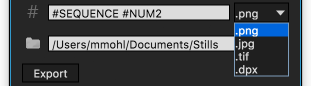
Export directly to jpg format for a small file size, or to png if you need transparency or lossless quality. tif and dpx images are also supported.
Flexible Naming
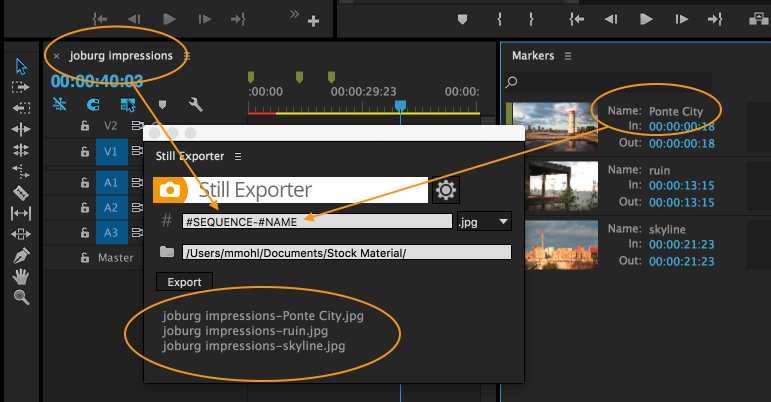
No need to tediously rename each of the files after export. Describe how the exported images should be named using easy to use, powerful naming patterns. The naming pattern supports the following placeholders:
- #NUM number of the marker (or #NUM2, #NUM3 etc. to pad the number with leading zeros)
- #NAME the name of the marker
- #COMMENT the comment of the marker
- #PROJECT the name of project file (excluding the extension .prproj)
- #SEQUENCE the name of the sequence
- #TIMECODE timecode of the frame (in the timecode format that you chose on Premiere Pro for the sequence). In parenthesis you can also add a custom separator symbol between the hours, minutes, seconds and frames. So #TIMECODE(-) will exports timecodes like 00-00-00-00, #TIMECODE(#) will use 00#00#00#00 and #TIMECODE() will use no separator at all, i.e. 00000000
Including Timecode in Filenames
Bundle Deal
Still Exporter is also available as part of the Editing Essentials Bundle:
QuickImporter, Still Exporter and BeatEdit - 3 Premiere Pro extensions for an unbeatable price. get bundle.
| Premiere | 2024, 2023, 2022, 2021, 2020, CC 2019, CC 2018, CC 2017, CC 2015.3, CC 2015 |
|---|
1.2.000 (Current version) - Aug 18, 2020
1.1.001 - Oct 8, 2019
1.1.000 - Aug 29, 2019
1.0.3 - Oct 20, 2017
1.0.2 - Nov 3, 2016
1.0.1 - Aug 5, 2016
1.0.0 - Apr 19, 2016
-

- Compatibility After Effects
XML Gibson
XML Gibson is a script that allows you to export your composition to XML files.Add to Cart -
- Compatibility Premiere
- Compatibility Media Encoder
RenderSegments
Render/Export segments from markers, Export Various Sections At Once, Render marker regions to clips in Premiere Pro!Add to Cart -

- Compatibility After Effects
Rift
Provides methods to shift, sequence, stagger, or randomize layers properties like in and out points, keyframes, markers and more, presented in a compact UI.Add to Cart -

- Compatibility After Effects
- Compatibility Premiere
- Compatibility Media Encoder
Screen Saver Exporter
Add to CartExport your movie to a screen saver in one click!
-

- Compatibility After Effects
- Compatibility Photoshop
- Compatibility Premiere
- Compatibility Illustrator
Motion Clock
Add to CartAccurately tracks and exports (Bar chart and CSV) your project hours in real-time in all Adobe Creative Suite applications (After Effects, Illustrator, Photoshop, and Premiere Pro). It's intuitive, unobtrusive, and syncs with your workflow effortlessly. Motion Clock ensures that every minute counts. Don't just track time; master it.
Pros, Freelancers: One-time leap, eternal tracking. Your creative flow is charted and sketched into an easy-to-export report!
-
- Compatibility After Effects
Smart Adapt - Recurring Subscription
Add to CartSmart Adapt is an After Effects extension that allows you to create hundreds of screen adaptations in a few steps, with the ability to export the list of your screens to use next time.
Please note that this is a monthly recurring subscription, it is also available as an annual subscription (get 2 months free)
-
- Compatibility After Effects
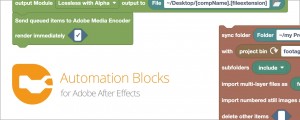
Automation Blocks for After Effects
Add to CartAutomation Blocks is an infinite collection of premade, one-click tools for any task. With Automation Blocks, you can fully customize all the tools, and even create your own!
$59.99 -

- Compatibility After Effects
BeatEdit for After Effects
Add to CartAuto-detect beats in a music track, wiggle to the beat, write markers, repeat keyframes, stagger layers, and more!
$149.99 -

- Compatibility After Effects
Broadcast Bundle for Squash & Stretch Pro
This bundle includes 130 behaviors and more than 200 sound effects for Squash & Stretch Pro, all with a subtle, elegant style.Add to Cart$39.99 -

- Compatibility After Effects
Tracker2Mask
Move masks with trackpoints. Importantly, you don't need one trackpoint for each maskpoint.Add to Cart$9.99 -

- Compatibility After Effects
Orient World
After camera tracking set the ground plane of your scene and orient everything accordingly.Add to Cart$19.99 -

- Compatibility After Effects
CopyMask2Layer 2
When you copy a mask from one layer to another, it often changes its position. With CopyMask2Layer, you can copy masks while keeping their position perfectly – even if the layers are moving and the mask path is keyframed.Add to Cart$9.99 As low as: $7.98