
Vector Paint Studio
-
Compatibility After Effects Please check exact version compatibility under the "COMPATIBILITY" tab below
 Adding to cart...
 KEY FEATURES
ADD STROKES TO A NEW GROUP
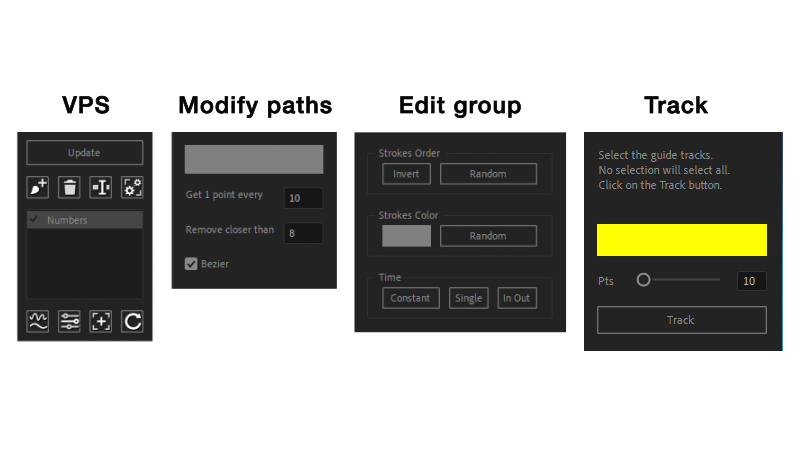
Draw, select the strokes, click on the Add button, name a group name.
MODIFY AND SIMPLIFY STROKES PATHS
Select a group, click on the Modify Paths button, play with options to reduce paths points, edit paths as needed.
EDIT GROUP
Select a group, click on the Edit Group button, play with paint null options stylize, transform and animate strokes.
TRACK GROUP
Select a group, select tracked elements (face tracking effect, track points, masks, 3d camera and 3d tracked solids), click on the Track button. Select the generated tracking points (no selection is going to select all of them), and track to apply tracking to the group strokes.
| After Effects | 2024, 2023, 2022, 2021, 2020, CC 2019, CC 2018, CC 2017, CC 2015.3, CC 2015, CC 2014 |
|---|
1.0.3 (Current version) - Sep 13, 2022
1.0.2 - Jun 15, 2022
1.0.1 - Jun 15, 2022
1.0 - Jun 13, 2022
-
- Compatibility After Effects
Magic Switcher PRO
Add to CartThe Magic Switcher Pro lets you turn On and Off Layer Styles, Effects, and Adjustment Layers with a single click across your entire project! Also available for free!
-

- Compatibility After Effects
Broadcast Bundle for Squash & Stretch Pro
This bundle includes 130 behaviors and more than 200 sound effects for Squash & Stretch Pro, all with a subtle, elegant style.Add to Cart -

- Compatibility Premiere
Textyle Premiere
Add to CartAnimate text with an easy to use interface that includes many presets and styles in Premiere Pro
-

- Compatibility After Effects
ColorSwap
Add to CartNow supports keyframed colors. Easily search and replace colors within your comp, your selection or your entire project.
$24.99 -
- Compatibility After Effects
Ustav — Text layouts editor
Add to CartNEW: Simple selection tool. Quickly create and edit text layouts.
Headers text • Paragraph text • Numbered text list • Bulleted text list • To-Do text list • Quote text • Divider • Callout text -

- Compatibility After Effects
Parenter
Add to CartQuickly reposition layers without affecting their animation!
-

- Compatibility After Effects
Textor
Add to CartCreate stunning text animations in seconds with sliders! Then save and apply them on any text layer!
$39.99 -

- Compatibility After Effects
Motioneer Lite
Add to CartIt's a motion engine. Copy animations (and also save with the full version), then attach or apply them to layers retaining comp / layer ratios.
$29.99 -
- Compatibility After Effects
Text Force
Add to CartSpeech Mode New Feature in v1.9. Instantly generate fast-cut text animations based on 12 parametric styles. Sync animations with audio and voiceovers tracks. Run it fully automatic or setup as you like.
$89.99 -

- Compatibility After Effects
ReTrack 2
It's a motion-tracking engine and editor. Use together all types of AE tracked data and re-track difficult shots precisely with selections. Rebuild partial tracked data. Adjust bad tracking by working above tracked keyframes.Add to Cart$59.99 -
- Compatibility After Effects
Layer Force
Add to CartPremiere Auto Paste New Feature in v1.1.Instantly generate modern transitions and slideshows based on 19 styles. Sync animations with audio and text voiceovers. Run it fully automatic or setup as you like.
$89.99 -

- Compatibility After Effects
Mask Transformer
Add to CartEnable masks transformations, with real values input, and motion paths.
$34.99